
Flight-weather forecast with paraglidable.com
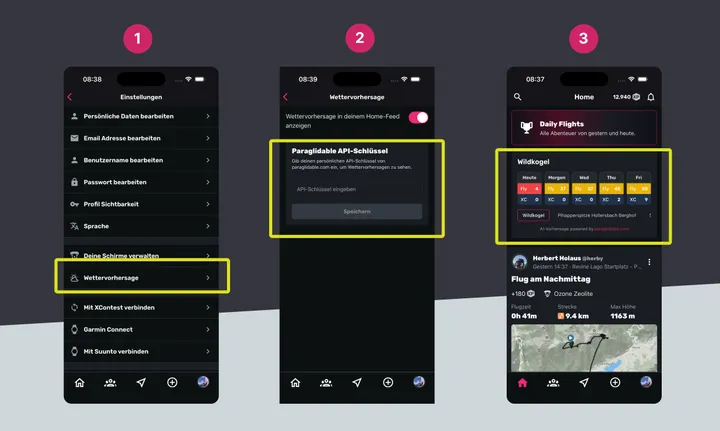
Often you just want to know whether it flies today or in the next few days — and whether it is worth digging into the weather at all. That is where the simple, fast overview from paraglidable.com helps.
Paraglidable uses AI to forecast flyability and XC potential for a day. Millions of flights were matched with the weather of those days to predict future flying days.
All of that becomes two simple numbers: Can I fly? (0–100 %) and XC potential (0–100 %).
This post shows how to bring those numbers for your flying area into the Sidekik app.
Add Paraglidable to Sidekik
Two steps to a personalised overview.
- Generate an API key for up to 10 forecast locations on https://paraglidable.com
- Open https://paraglidable.com. Best on a desktop or laptop. Tap the “WIFI icon”, then “Get an API Key”.
- Pick up to 10 spots. You can use the green/red points, or pick a free point on the map and name it.
- Enter your email and tap “Send the key”.
- You get an email with your API key — check spam.
- Add the key in the Sidekik app
- Open Sidekik
- Go to settings. You will find them in the profile, top right, on the gear.
- Scroll down and open “Weather Forecast”.
- Paste the API key and save.
- From then on the forecast should show on your home screen.
If you want to change forecast locations, request a new API key to your email and replace the key.
If paraglidable helps you plan flying days, consider leaving a donation for Antoine.