
Tracking Reloaded
For many of us, paragliding is more than a sport. It is shared experiences, group motivation, and sharing your flights with others.
The new tracking in the Sidekik app is meant to support exactly that: more overview in the air, more ways to fly together — and a foundation for new community features.
Tracking now includes many extras that help you in flight and on Hike&Flys.
New design
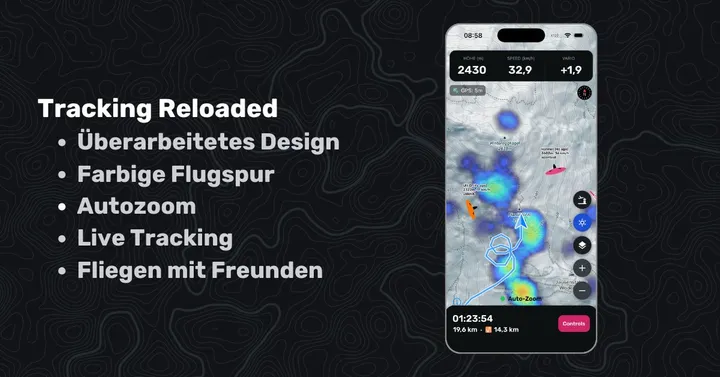
The most important numbers (altitude, speed, vario) sit at the top of the screen. Less urgent ones — flight time, track length and XC distance — moved to the bottom. That leaves more room for the map.
The control buttons on the right are larger and round. Extra spacing makes them easier to hit — especially in the air.
Coloured track: Simple. When you climb, the track goes orange to dark red. When you sink, blue to dark violet. That helps a lot when you find and centre a thermal. After about 5 minutes the track is simplified automatically. The coloured segments become one continuous blue line. That saves battery and keeps longer flights readable.
Auto-zoom
There are three zoom levels, and the app switches between them automatically.
Normal: Straight flight below 35 km/h.
Thermal + waypoint: When you turn, the map zooms in. The coloured track is easier to read and helps you centre. Approaching a challenge waypoint also zooms in so you can aim at the centre. In straight flight it returns to the normal zoom.
Distance: After flying faster than 35 km/h for a while, the map zooms out. Valley crossings and the next turnpoint are easier to judge.
You can turn auto-zoom off at any time.
Live Tracking [BETA]
When you start a new activity (Hike & Fly or flight) you can now enable live tracking. Other pilots using Sidekik can then see you.
In the air you can also see other pilots — people flying with Sidekik, or people sharing their position via XContest Live (for example XCTrack, FlySkyHy, and similar).
For your position from the XContest Live server to appear in Sidekik, connect your Sidekik account to XContest. You can do that in app settings under XContest Import.
Many of the new features are there to make flying together more visible. More community features around live tracking will follow in later updates.
Feedback
These functions are free from today. If you have ideas or find a bug, write to [email protected]
Enjoy the new features — and a good start to the thermal season.